Go to Content › Popups and click Add popup, pick an idea, name it and click Create popup. Change the words and when it opens, click Preview on site, then turn it on and publish your site.
A popup can be a Box, a Slide-in, a Full screen, a Bar at the top or a Bar at the bottom. It uses your site's own fonts and colours and starts turned off, so nothing shows until you publish.
Add a popup
- Open your site and go to Content › Popups, then click Add popup.
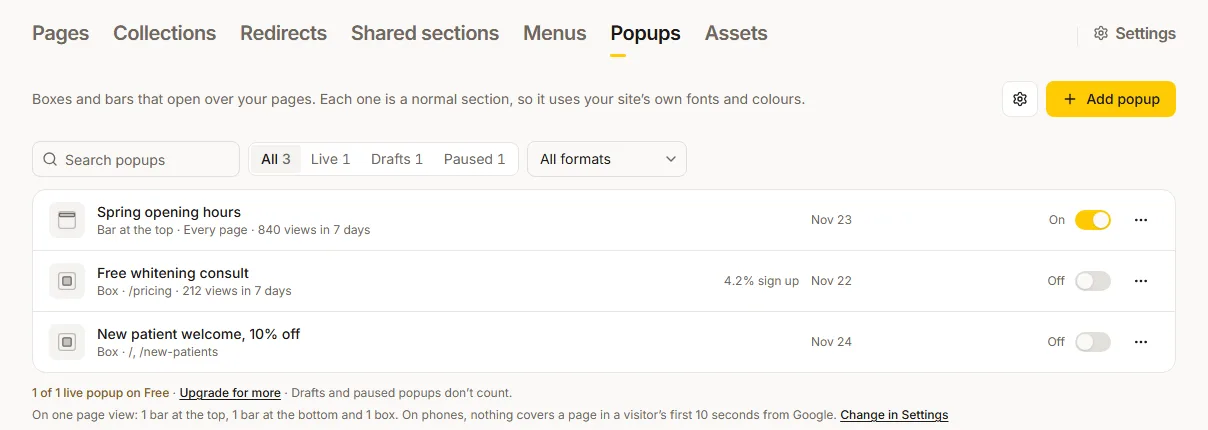
Content › Popups lists every popup on the site. - Under Start from an idea, pick one: Newsletter signup, Exit offer with a code, Free download, One-question survey, “Still looking?” nudge, Announcement bar, Offer with a countdown, Link bar or Welcome screen. Or pick Blank popup to write it yourself. Use the format buttons (Box, Slide-in, Bar at the top, Bar at the bottom, Full screen) to narrow the list.
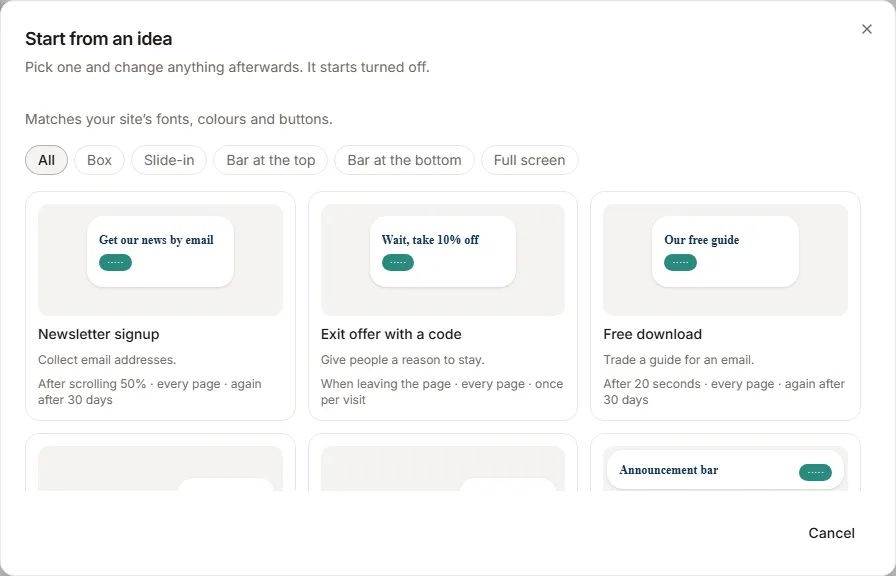
Every idea starts turned off. - Give it a name, fill in the text the idea asks for and click Create popup. You can rename it later.
- On the popup's page, change What it says. Click Edit in editor to change its design on the page itself.
- Open When and pick a trigger: After some seconds, After scrolling, When leaving the page or When someone clicks…. Under Where, Who and How often choose the pages, the devices, new or returning visitors and when it may come back. Dates sets a start and an end.
- Click Preview on site to see the popup open on your page. Preview with rules opens your page the way a visitor would get it, so you can see whether the popup's rules would show it.
- Click Save changes, turn the popup On, then publish your site. The popup is live when the publish finishes.
Turn a section you already have into a popup
In the editor, right-click the section and choose Turn into popup. dotsy copies the section and its styles into a new popup that starts turned off. The section stays on the page. The popup shows on that page only until you add more pages in its settings.
Turn a popup off
For a live popup, choose Turn off now (in the ⋯ menu of its row in the list, or on the popup's page). It takes the popup off your live site right away and leaves your other unpublished changes as drafts. If you switch it Off instead, it turns off when you next publish.
See how a popup does
Open a popup to see Views, Closed, Conversions and the conversion rate for the last 30 days. The list shows views for the last 7 days.
Open a popup from your own button or link
Open the popup's Open from code section. It shows how to open the popup from your own button or link, even when it has no trigger.
Ask your AI assistant
If Claude, ChatGPT, Cursor or another assistant is connected to dotsy, ask it to add a popup, for example “add an announcement bar about our opening hours”. It uses put_popup; get_popups reads your popups and their numbers, and delete_popup removes one. Not connected yet? See How do I connect dotsy to Claude, ChatGPT or Cursor?
Popup not showing
- It isn't live yet. A new popup starts turned off, and a change is a draft until you publish.
- Free sites can show 1 popup at a time. To turn on another one, turn the first off, or upgrade. Drafts and paused popups don't count.
- Its rules don't match. Check Where, Who, How often and Dates. A visitor who closed it recently doesn't see it again until the wait is over. Use Preview with rules to see what a visitor gets.
- Another popup is in its place. On one page a visitor sees at most 1 bar at the top, 1 bar at the bottom and 1 box. The popup with the higher priority wins.
- A phone visitor from Google just arrived. By default, nothing covers a page during their first 10 seconds. You can change this under the gear on the Popups page.
- The cookie banner is on top. The banner always sits above popups, in the same corner it can cover a bar or a slide-in. See How do I set up the cookie banner on my site?
FAQ
Can a popup have a form?
Yes. Newsletter signup, Free download and One-question survey have a form. It sends without leaving the page, shows your thank-you message and the answer lands in your Forms inbox.
Does a popup match my site?
Yes. dotsy reads your site's fonts, colours and buttons, so a new popup uses them. If it can't read your site, it uses a plain look until you set the colours and fonts yourself.
How many popups can I have?
A site can hold up to 20 popups. A Free site can have 1 live at a time, a paid plan has no limit on live popups.