Your domain's DNS still sends visitors to your old host. In dotsy, open Settings › General and click Finish setup next to the domain: any record marked Wrong value still points elsewhere. Change it to custom.dotsy.site at your DNS provider and delete old A or AAAA records for the same name.
Find the record that still points at the old site
- Open your site in the dashboard and go to Settings › General. In the Domain card, click Finish setup next to your domain.
- On Connecting your domain, look at each record's status:
- Found: this name already points at dotsy.
- Add this: the record doesn't exist yet. Add it.
- Wrong value: a record with that name exists but points somewhere else, usually your old host. The address above it says Wrong DNS value — replace the record.
- Remove extras (TXT records only): there's more than one TXT record with that name. Keep only the one dotsy shows.
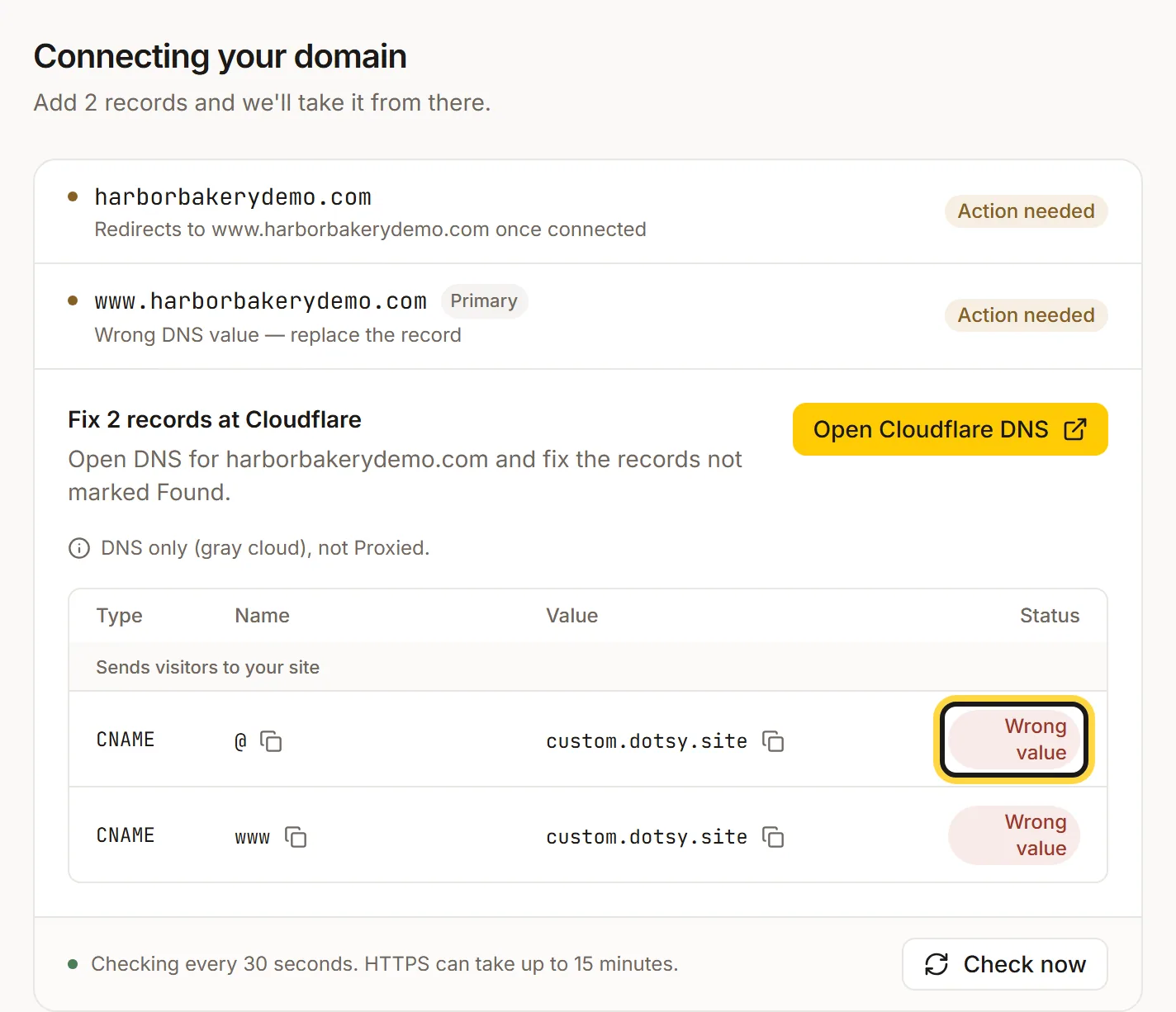
Wrong value means the record still points somewhere else, usually your old host. - Click the button that opens your provider's DNS (for example Open Cloudflare DNS). Edit each record marked Wrong value so its value is exactly
custom.dotsy.site. If the same name also has old A or AAAA records, delete them: a name can only point one way. For Remove extras, delete the TXT records dotsy doesn't show. Don't touch MX records (email). - Back in dotsy, click Check now. When every record shows Found, HTTPS follows within a few minutes and the domain shows your dotsy site.
dotsy says Found, but I still see the old site
Your computer, phone or network still remembers the old answer. DNS answers are kept for a while (the record's TTL, often an hour, sometimes longer), so the change reaches people at different times. Try a private window, or your phone on mobile data instead of Wi-Fi. If it still shows the old site after a few hours, email us with your domain.
Only the bare domain (or only www) shows the old site
Each address needs its own record. Check both example.com and www.example.com are listed on the connect page. At GoDaddy and other providers that can't point the bare domain at dotsy, the bare domain needs a forward to www: How do I connect a GoDaddy domain to dotsy?
I changed the records at the wrong company
Your DNS is managed where your domain's name servers point, which isn't always where you bought it. dotsy names the provider it finds on the connect page (for example Fix 2 records at Cloudflare): make the change there. Guides: Cloudflare, Namecheap, Squarespace, GoDaddy.
FAQ
How long does a DNS change take?
Often a few minutes, sometimes a few hours, depending on your provider and the old record's TTL. dotsy keeps checking every 30 seconds, so you can leave the page.
Should I cancel my old host now?
Wait until your domain shows the dotsy site for you and dotsy says Your domain is live. Keep your email running where it is: moving a website doesn't move email.
Is the old site still online at its old address?
Yes, until you cancel it. Changing DNS only changes where your domain sends visitors.