Saved changes reach your live site only when you publish them. If Publish in the top bar shows a number, click it, then click Publish in the panel. Already published and still seeing the old page? Reload it, check you're on the live address, and make sure new images were published too.
dotsy keeps two versions of your site: the draft you and your AI edit, and the live site visitors see. Publishing copies the draft to live, and the live site shows the new version straight away.
Publish your saved changes
- Open your site in the dashboard. In the top bar, Publish shows how many saved changes aren't live yet. If it says Up to date, everything is already published: skip to the next section.

The number on Publish counts saved changes that aren't live yet. - Click Publish. The panel lists the changed pages. Click Publish 1 change (the number matches your changes). Review changes shows each change next to the live page first.
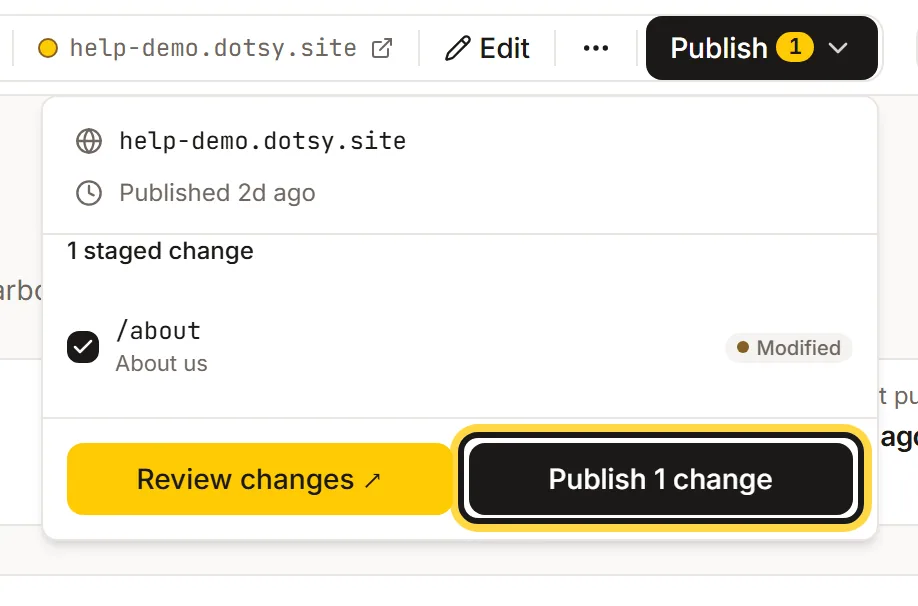
Click Publish in the top bar, then Publish 1 change. - You see Site published in the bottom corner. Reload your live page.
Made a mistake? Undo in that message puts the previous version back: How do I undo a publish or restore an earlier version?
My AI said it updated the site
Changes your AI makes through dotsy (Claude, ChatGPT, Cursor and others) are saved as drafts. Nothing goes live until someone publishes. Ask your AI to publish, or publish from the dashboard as above.
I published, but I still see the old page
- Your browser kept an old copy. Reload with Ctrl+Shift+R (Cmd+Shift+R on a Mac), or open the page in a private window.
- You're looking at a preview. A draft preview link shows unpublished changes; your live address shows what's published. Open the address shown in the top bar, or your own domain.
- A new image or file doesn't show. Uploaded images and files reach the live site at the next publish, together with the pages that use them. Publish again after you upload.
- Your domain shows a different site. If
yoursite.dotsy.siteis up to date but your own domain isn't, the domain's DNS still points elsewhere: Why does my domain still show my old website?
Edits go live without publishing
That's how a site works when Review before publishing is off in Settings › General: edits you save in the editor go live straight away. Turn it on (Core and up) to keep edits as drafts until you publish.
FAQ
How long after publishing does my live site change?
Straight away. Each publish creates a new live version, so visitors get the new pages on their next load. Only a copy already open or saved in someone's browser can show the old page until it reloads.
Does publishing ship everything that's pending?
Yes. Publish sends every unpublished change on the site, including ones your AI or a teammate made. Click Review changes first to see them.
Do I need to clear a cache in dotsy?
No. dotsy updates its own cache every time you publish, so there's nothing to clear.