In dotsy, go to Settings › General and click Connect domain. At Cloudflare, add two CNAME records, @ and www, both pointing to custom.dotsy.site, and set each one to DNS only (grey cloud), not Proxied.
Cloudflare accepts a CNAME on the bare domain (it "flattens" it), so both example.com and www.example.com can point at dotsy. Any Cloudflare plan works, including the free one.
Steps
- Open your site in the dashboard and go to Settings › General. In the Domain card, click Connect domain.
- Type your domain, keep Connect apex and Connect www ticked and click Continue setup.
- dotsy recognises Cloudflare and lists the two records, with the note DNS only (gray cloud), not Proxied. Click Open Cloudflare DNS.
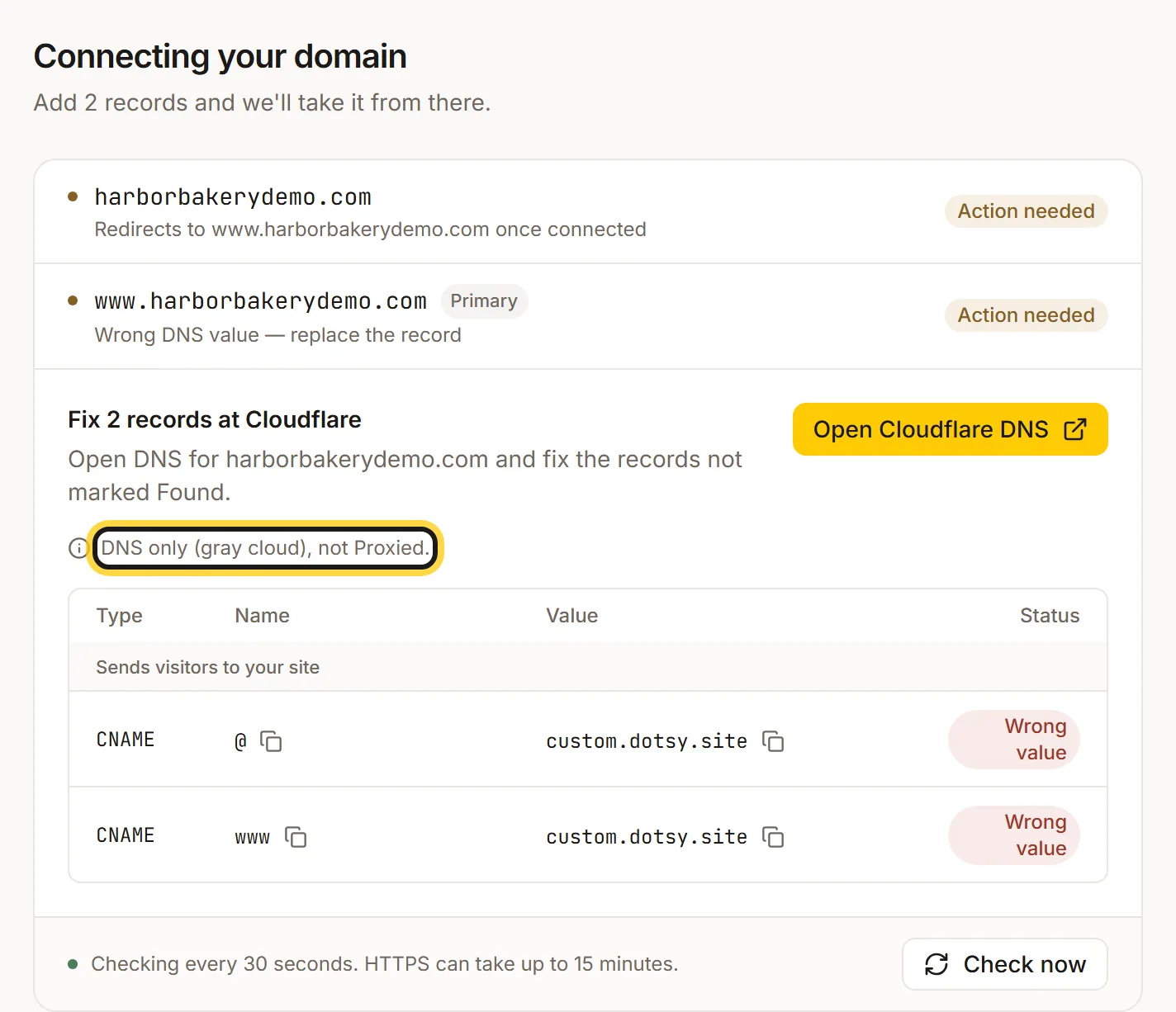
dotsy recognises Cloudflare. Set both records to DNS only, not Proxied. - In Cloudflare, open your domain's DNS records. For each name,
@(shown as your domain) andwww: if a record already exists (A, AAAA or CNAME, usually your old site), edit it or delete it, so only one record answers for that name. Then add or edit a CNAME record with the targetcustom.dotsy.siteand switch its proxy status to DNS only (grey cloud). Save. Leave MX and TXT records alone. Cloudflare's menu names can change, so its labels may differ slightly. - Back in dotsy, it checks every 30 seconds, or click Check now. Each record changes to Found, then HTTPS follows, usually within a few minutes and at most 15. When you see Your domain is live, you're done. With both addresses connected,
wwwis the Primary one and the bare domain redirects to it.
Can dotsy add the records for me?
Yes, when your DNS is at Cloudflare. Above the records, dotsy can show Connect automatically (recommended) with a Connect with Cloudflare button: sign in to Cloudflare, allow dotsy to edit that domain's DNS, and dotsy adds the records for you. If you'd rather do it by hand, use the records under Or set records manually.
HTTPS never finishes, or the site shows a Cloudflare error
The record is set to Proxied (orange cloud). A proxied record sends visitors to your Cloudflare zone instead of to dotsy, and the certificate can't be checked. Switch both records to DNS only. More causes: Why is HTTPS still pending on my dotsy domain?
Wrong value
A record for that name still points somewhere else, usually your old host. Edit it so the value is custom.dotsy.site, and delete leftover A or AAAA records for the same name. See Why does my domain still show my old website?
FAQ
Do I lose Cloudflare's speed and protection with DNS only?
No. dotsy itself runs on Cloudflare's network, so your pages are still served from Cloudflare's edge with HTTPS. DNS only just means your own Cloudflare zone doesn't sit in front of dotsy.
My domain is registered elsewhere but uses Cloudflare DNS. Is this the right page?
Yes. What matters is where the DNS is managed. If your name servers end in ns.cloudflare.com, follow these steps.
Will my email keep working?
Yes, as long as you only change the @ and www records. Don't delete your MX records.