If www.example.com already opens your dotsy site but example.com doesn't yet, open the … menu on the example.com row in Settings › General and choose Set up example.com. The bare domain keeps working exactly as it does now until you replace its records in step 2, and you can stop until then.
This is for a domain that is already in use: the bare domain still shows an old website, or nothing useful, and you want it to open your dotsy site without a gap. dotsy shows two steps and does nothing at your DNS provider by itself. For moving the website's pages and links, read How do I move my existing website to dotsy?
Steps
- Go to Settings › General. In the Domain card, open the … menu on the
example.comrow and choose Set up example.com. The item only appears for a bare domain whose DNS provider dotsy recognises, oncewww.example.comis connected.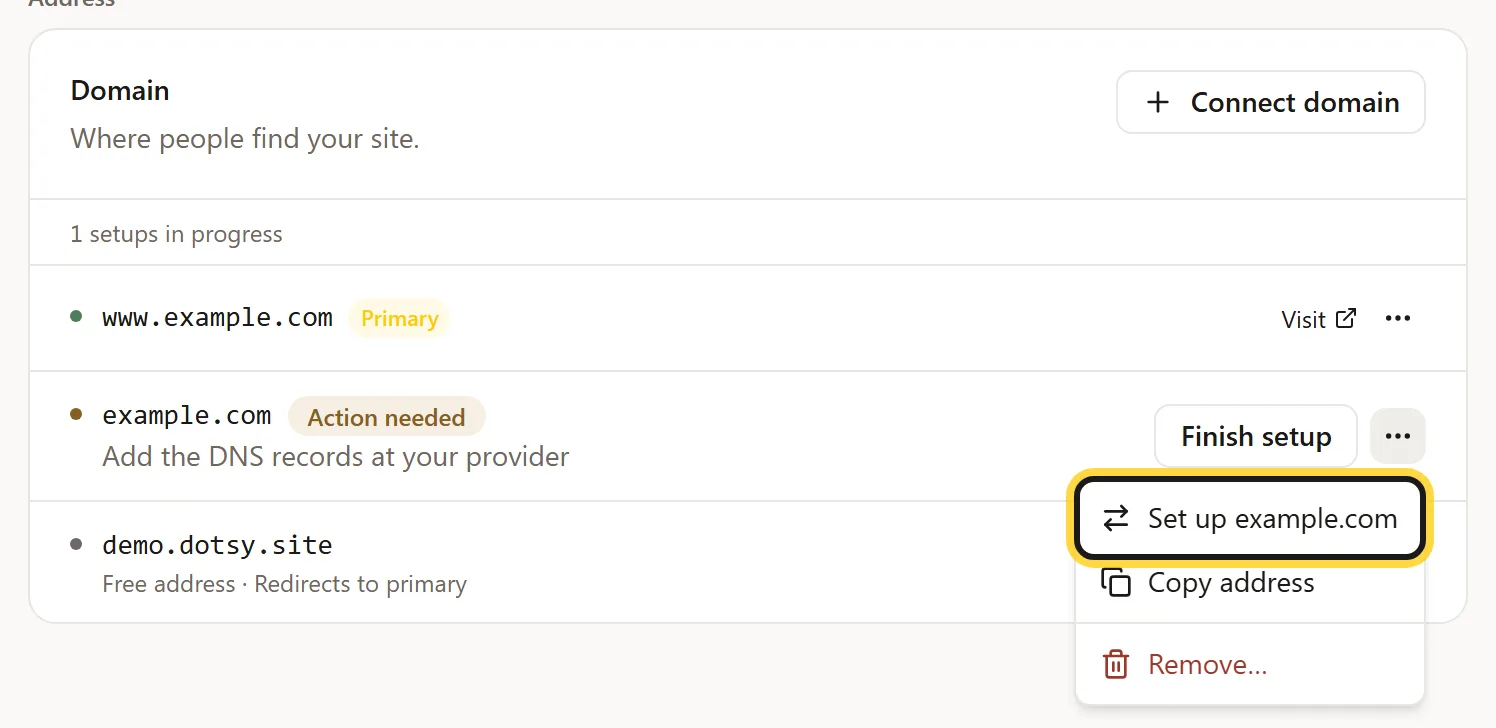
Settings › General › Domain: the … menu on the bare domain's row. - Read Set up example.com? and click Set up example.com. It says: two steps, example.com keeps working exactly as it does now until you replace its records in step 2, and you can stop and keep things as they were until then. dotsy answers Ready for step 1.
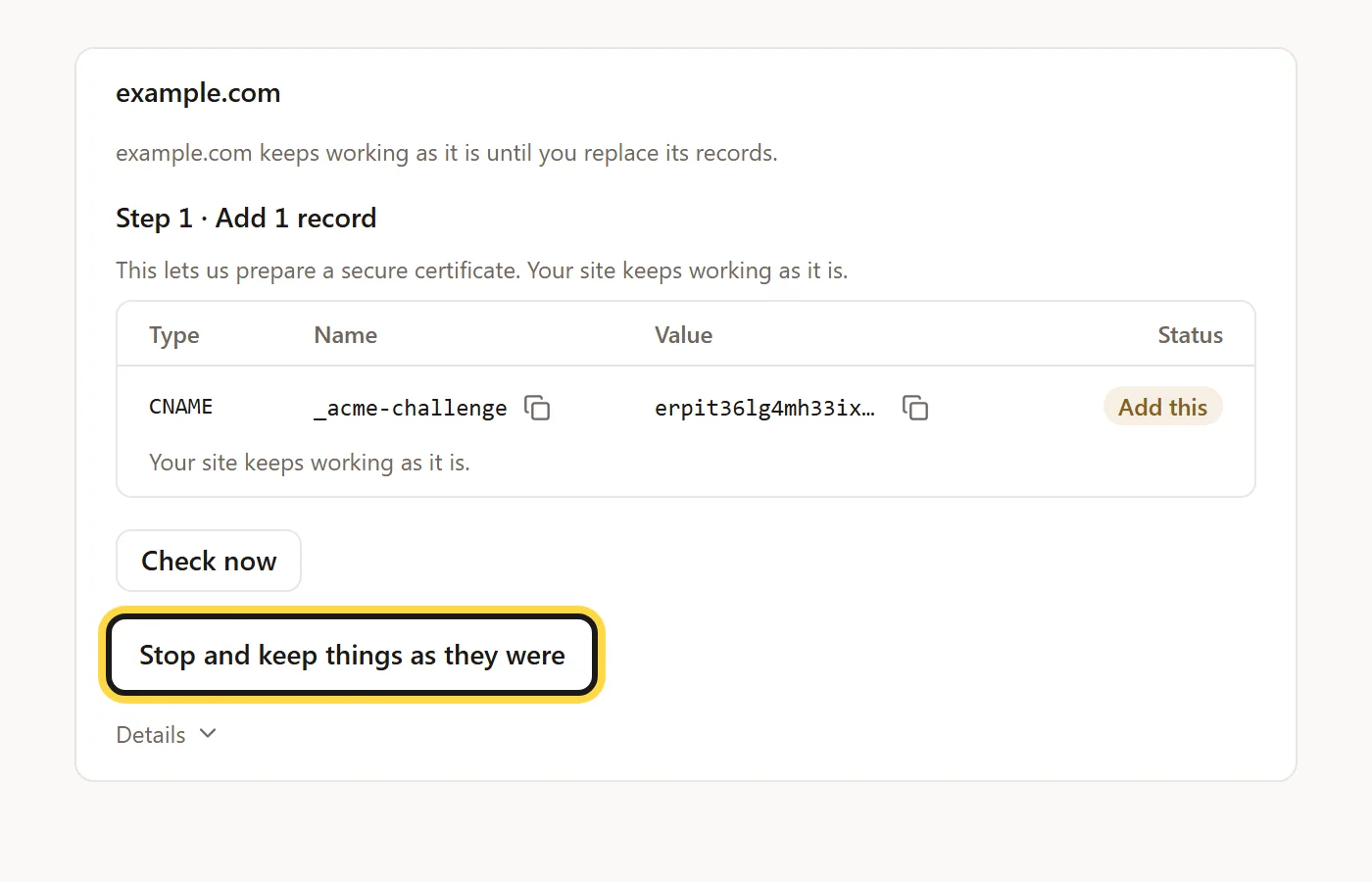
- Step 1 · Add 1 record. At your DNS provider add the one CNAME shown for
_acme-challenge. It only lets dotsy prepare a secure certificate; your site keeps working as it is. dotsy shows Preparing… usually a few minutes, then Ready for step 2. - Step 2 · Replace the records for example.com. Delete the old A or AAAA records for the bare domain that dotsy marks Delete this record, then add the two A and two AAAA records it lists. Mail records (MX, and the TXT records for email) stay as they are. Provider guides: Name.com, Namecheap, GoDaddy.
- Wait for Done — example.com now opens your site. dotsy shows Checking… (can take up to an hour) until then. After that,
example.comsends visitors towww.example.com, with the page path kept, andwwwstays your main address.
Stop before step 2
Until you replace the records in step 2, click Stop and keep things as they were under the domain and confirm Stop setting up example.com?. The bare domain goes back to exactly how it was, and nothing at your DNS provider was changed. You can delete the _acme-challenge record if you added it.
Once the new records point at dotsy, it can't be stopped any more. Finish step 2, or point the bare domain back at its old host at your DNS provider.
Couldn't set up
dotsy shows this with the reason underneath, and changes nothing:
- Connect www.example.com on this site first and wait until it opens the site — example.com will open the same site. Connect
wwwfirst (How do I connect my own domain?), wait until it opens your site, then try again. - example.com already opens this site, so we haven't changed anything. There is nothing left to set up.
- We can't set up example.com this way yet — we don't recognise its DNS provider, so nothing was changed. Use the records on the Finish setup page instead.
- example.com is being set up. Stop that first ("Stop and keep things as they were"), then try again.
FAQ
Will my old site go offline while I set this up?
No. The bare domain keeps showing its old site through step 1 and the wait for the certificate. It changes only when you replace its records in step 2.
Will my email keep working?
Yes. You only change the A and AAAA records of the bare domain and add a CNAME. Your MX records and email TXT records stay as they are.
How long does the switch take?
In our latest test the certificate was ready in under four minutes and the domain opened two minutes after the switch. dotsy says it can take up to an hour for every visitor.
Can I undo it?
Until step 2, click Stop and keep things as they were. After that, put your old records back at your DNS provider and remove the address from Settings › General.