Ask dotsy anything, get answers in seconds
Get answers in seconds, day or night: ask dotsy in your own words and it replies with a link to the page each answer comes from. Click the yellow button on any dotsy.ai page, or ? › Ask in the dashboard, and it brings in the team whenever you want a person.
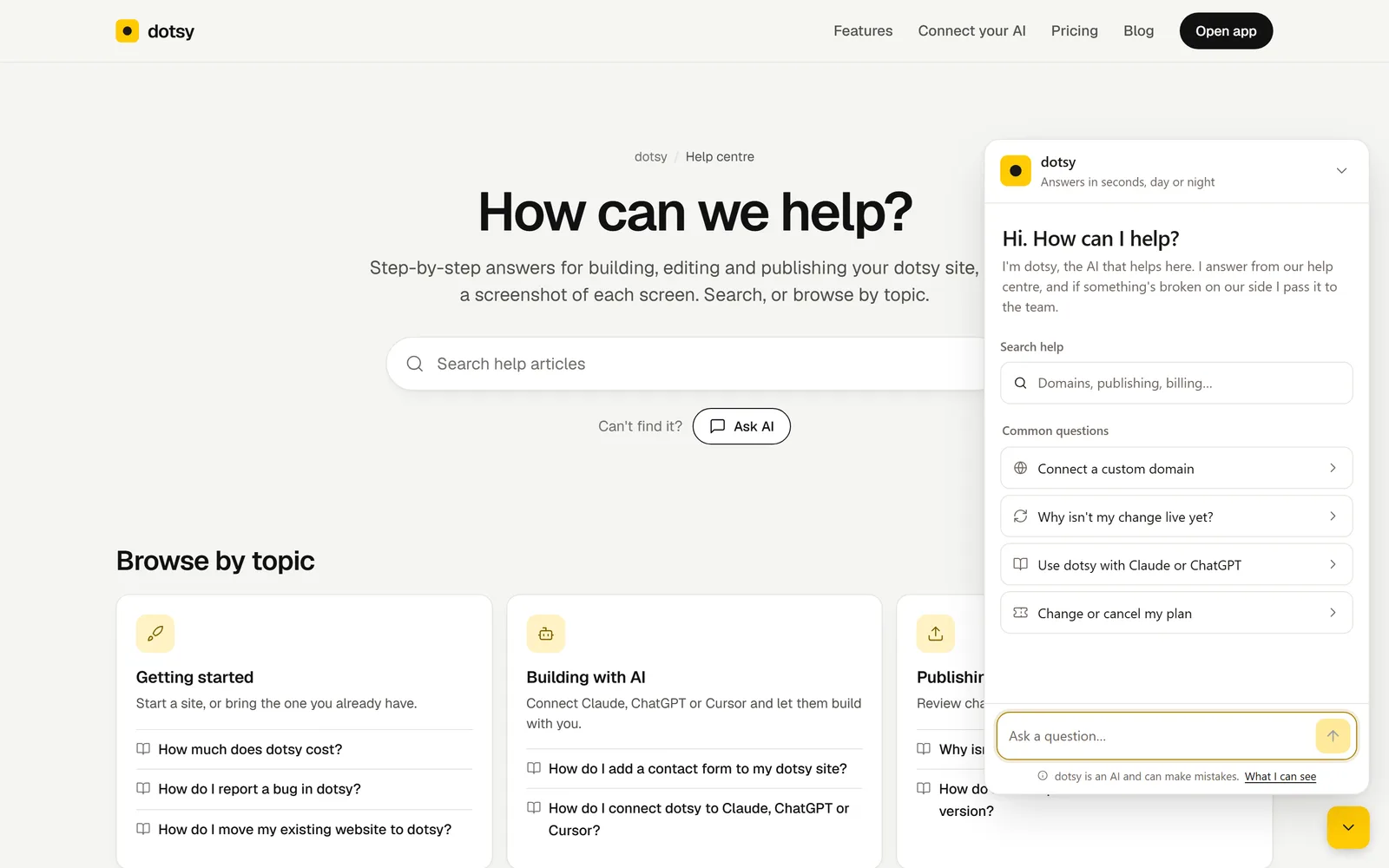
Connecting a domain, getting a change live, picking a plan: the chat finds the answer across dotsy.ai for you and shows exactly where it came from, so the full step-by-step is one click away.
What's new?
- A help chat on every dotsy.ai page. The yellow button in the bottom-right corner (Questions? Ask dotsy) opens it. No account needed. You can also start it from Ask AI on the help centre, Ask the assistant at the end of every help article, and under the pricing FAQ.
- In the dashboard too. Signed in, open the ? menu in the top bar and choose Ask. There it can also look at your account and sites, read-only, so it can tell you why a publish failed or a domain isn't connected yet. It never changes anything for you.
- Answers you can check. It answers from our help centre, pricing, changelog and blog, and links the page each answer comes from. When the answer isn't there, it tells you so and offers a person instead of guessing.
- A person when you need one. When it isn't sure, it offers Ask a person; when something looks broken on our side, it passes your question to the team itself. The team replies in the chat and by email.
- From your AI agent. Agents connected to dotsy over MCP can ask too:
report_bugwithkind: "question"gets the same answer with its links, and is handed to the team when it needs a person.
How to use it
- Open the chat: click the yellow button on any dotsy.ai page, or ? › Ask in the dashboard.
- Ask in your own words, in any language, or pick one of the common questions.
- Open the linked page for the step-by-step version, or tell it you want a person if you're still stuck.
Prefer to read? Browse the help centre. Found a bug instead? See How do I report a bug in dotsy?
Who can use it?
Everyone, on every plan, including Free, and visitors to dotsy.ai without an account. It is free to use.
What I can see under the message box shows exactly what it reads. It's an AI, so open the linked page before anything important.
Also new
Form emails to a shared mailbox. A form can now send its messages to any address, such as hello@ or sales@: the address gets an email and confirms with one click, no dotsy account needed, and each form email it gets has a link to stop them. See How do I add a contact form to my dotsy site?
This shipped from the roadmap: see Ask dotsy anything, get answers in seconds.
From the roadmap
Requested , released .
See it on the roadmapVote on the roadmap to hear when your ideas are released.